Look closer at every request.
Plonix is a web security workbench for the Mac. It captures everything your browser does, learns the real shape of the target while you explore it, and helps you search, replay and prove what you find. From a window, a terminal, or an AI agent.
GET /v2/me?next=%252Faccount%252Fsettings HTTP/1.1host: api.acme.testauthorization: Bearer eyJhbGciOiJIUzI1NiIsInR5cCI6IkpXVCJ9.eyJzdWIiOiIxMDQyIiwiZW1haWwiOiJib2JAYWNtZS50ZXN0In0x-trace: 6f726465722d73657276696365cookie: prefs=eyJyb2xlIjoidXNlciIsInRlYW0iOiJiaWxsaW5nIn0=x-forwarded-for: 10.20.4.17origin: https://shop.acme.testreferer: https://shop.acme.test/accountaccept: application/jsonsec-fetch-site: same-site
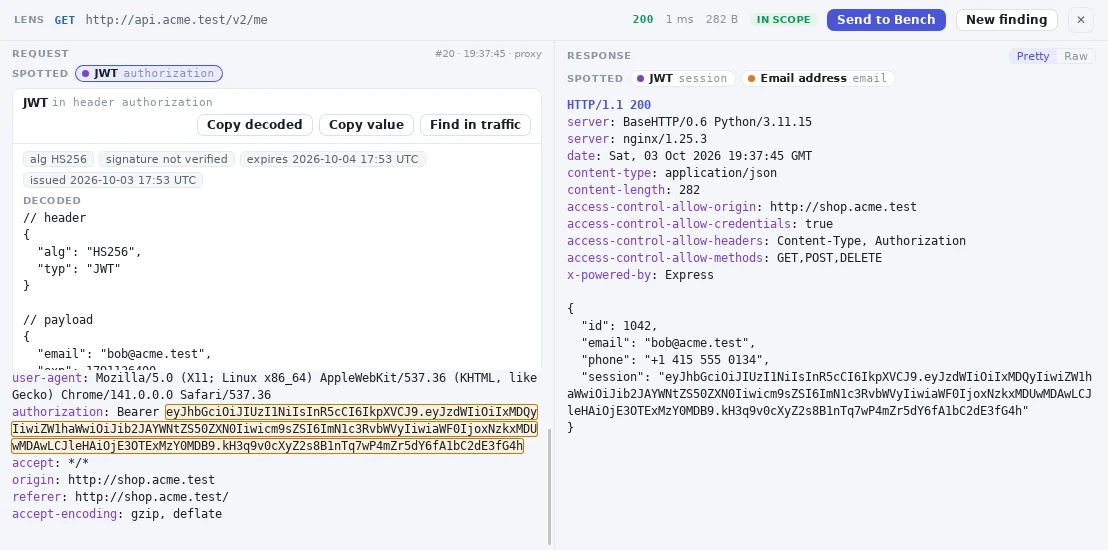
Move the lens over the request. Plonix decodes what it spots, right where it sits.
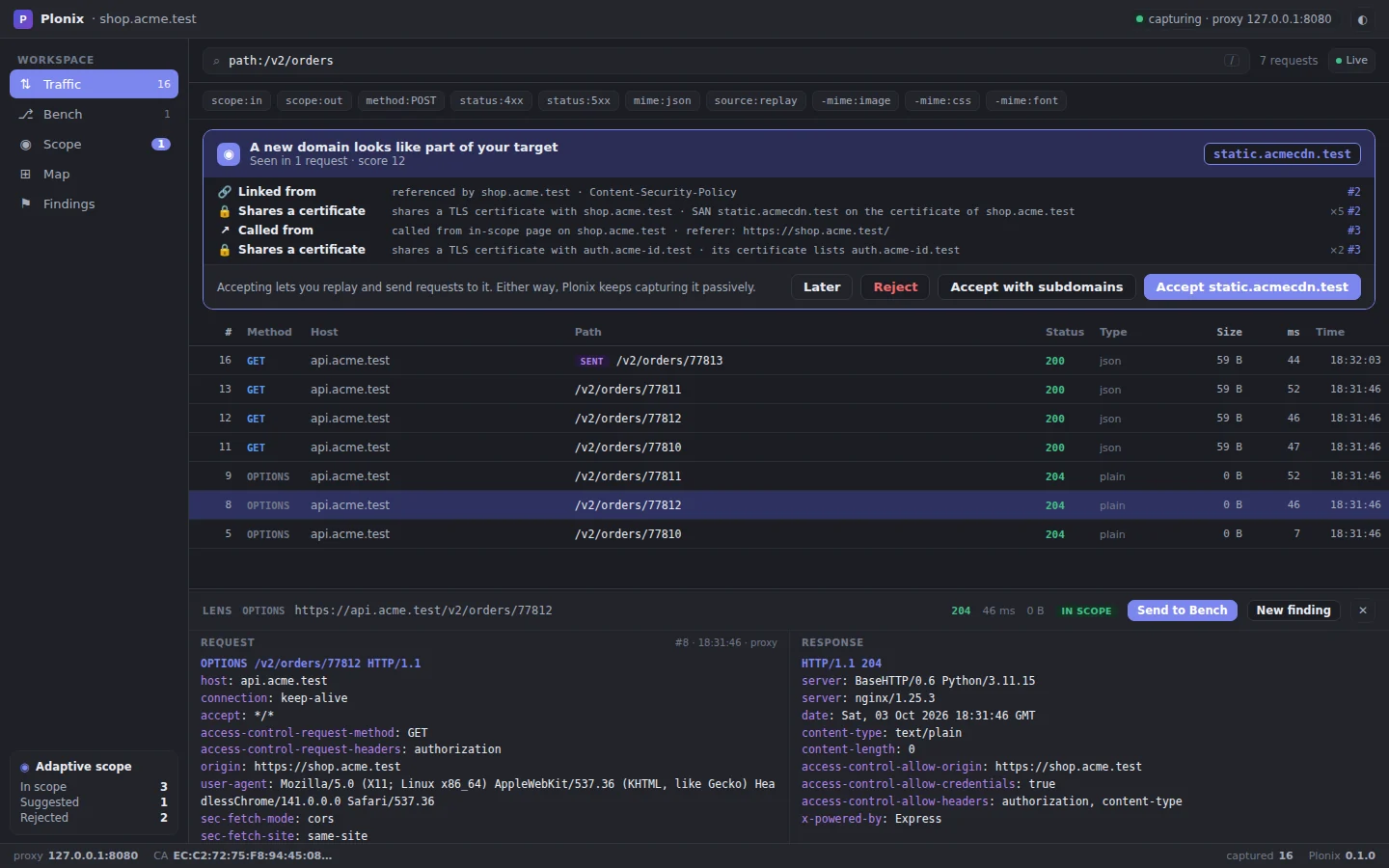
The Plonix window, capturing. A new domain is suggested for scope with the evidence behind it.
Everything a web assessment needs. Nothing it doesn't.
AI-first, built for Claude Code
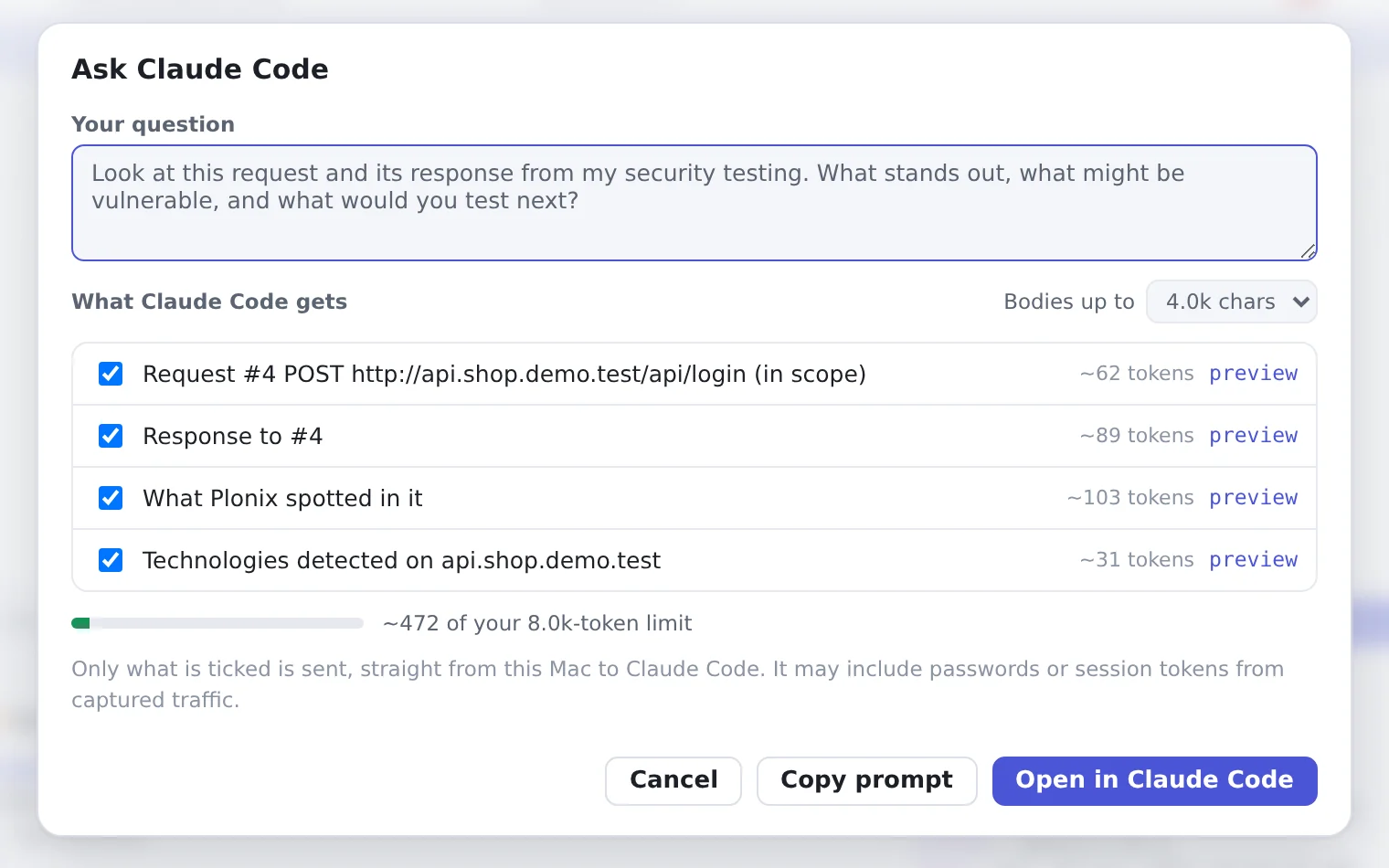
Built-in MCP gives Claude Code your live traffic, scope and findings in one command. Ask about any request with one click.
AI and agents →Several projects at the same time
Every project is its own folder, window, proxy and database. Open as many as you need; nothing collides.
Projects →A community Market for everything modular
Skills, rule packs, filter packs and bundles, maintained by the community and signed before they install.
Market →Advanced filtering
Type a query or click chips to show only or hide. Save named filters, and use the same query in the CLI and API.
Filtering →Scope that works, and stays easy
Scope grows as you browse, with evidence for every suggestion. One click to accept or reject, and noise like trackers is excluded for you.
Adaptive scope →Friendly from the first minute
One click or one command sets up the certificate, proxy, scope and a capture browser. A real Mac app with shortcuts you already know.
Get started →From first request to proven finding.
- 1CaptureTrafficEvery request and response, HTTPS included.
- 2DiscoverScope · MapDomains, hosts, endpoints and tech.
- 3InvestigateSearch · LensFilter fast, decode as you read.
- 4ExperimentBenchEdit, send, branch and compare.
- 5ValidateFindingsWrite it up with the proof attached.
Scope that learns the target while you browse.
Static allow-lists assume you already know every domain an app uses. You find out by using it. Plonix records everything, then suggests domains to bring into scope, each one backed by evidence you can click.
- Called from an in-scope page · Referer or Origin
- Redirected or linked · Location, page links, CSP
- Shares a session or a certificate · tokens and TLS SANs
- Enforced in one place · replays, sends and agents can only reach accepted hosts
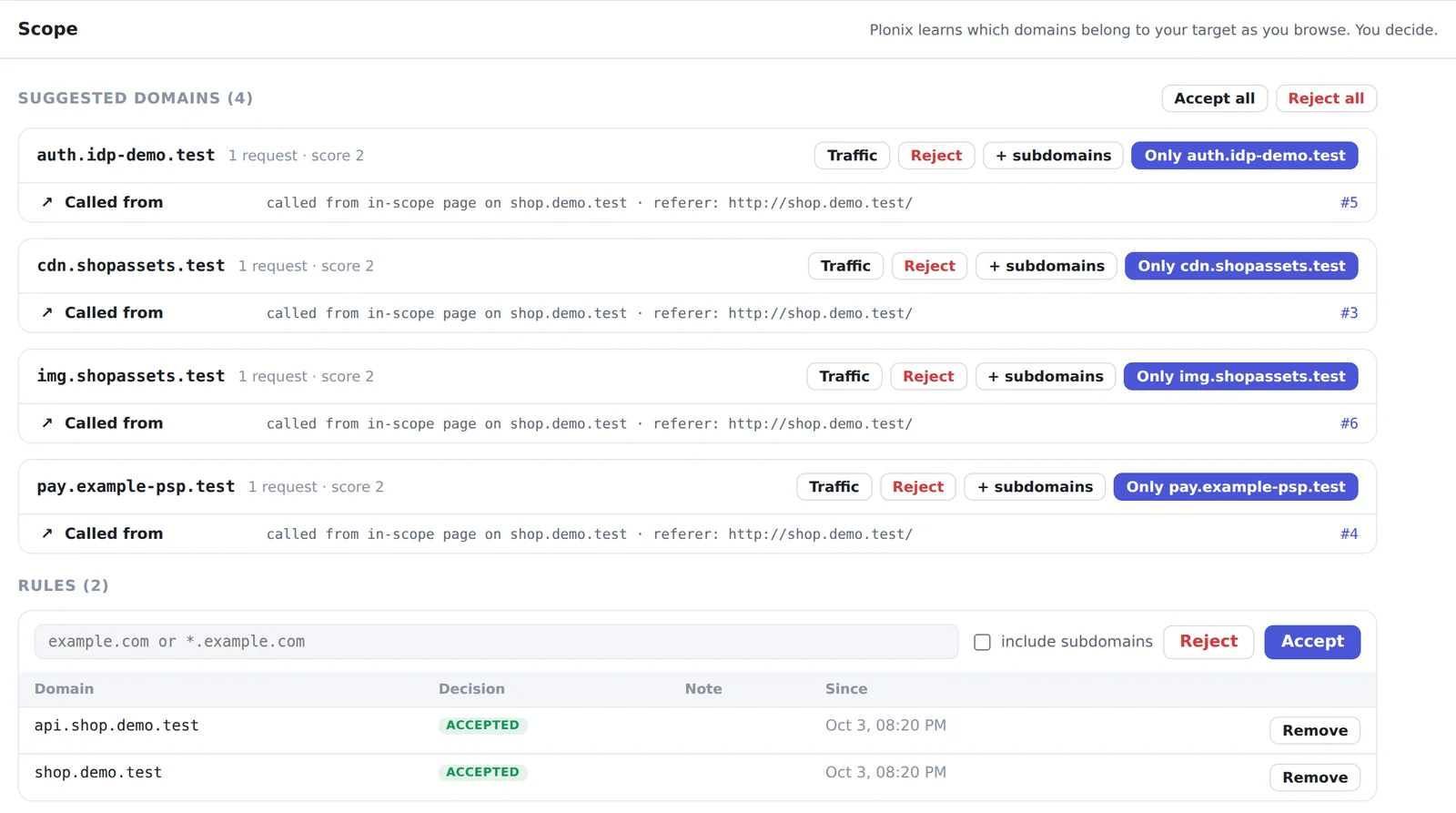
It points at what matters before you go looking.
The Lens shows the selected request and its response, decoded and pretty-printed. Above them, Plonix lists what it spotted. Click one to highlight it in place, copy the decoded value, or find it across everything you captured.
Detection runs locally, on traffic you already captured. A token's signature is never claimed valid.
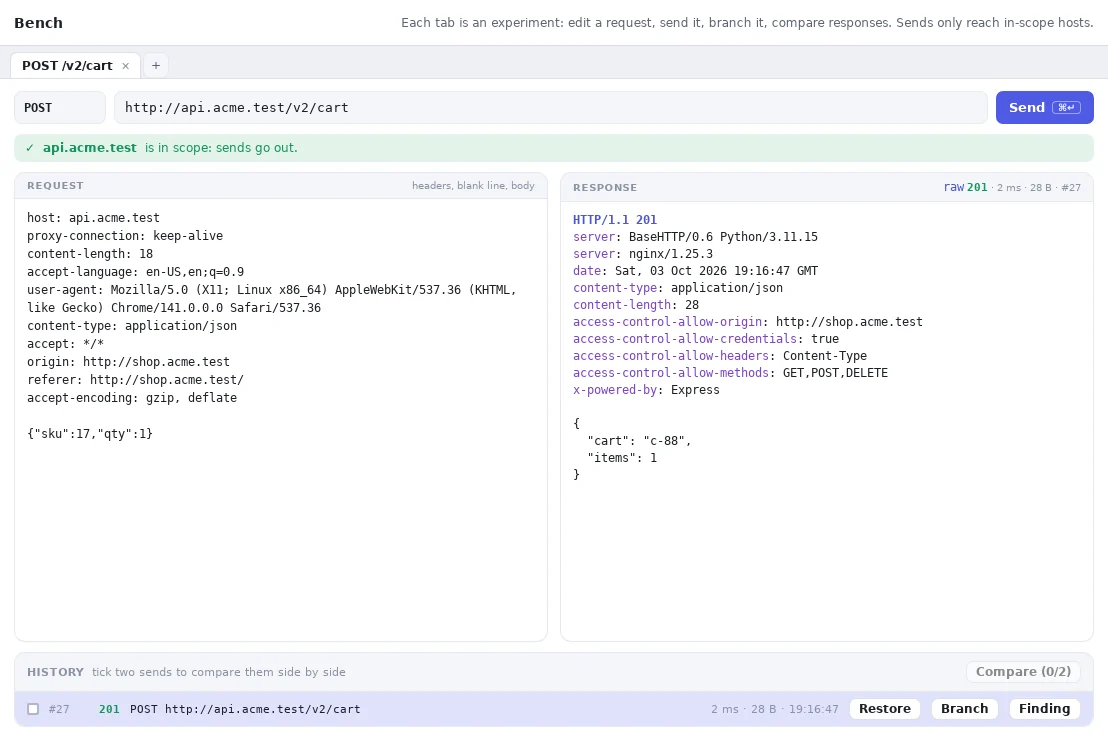
Experiments, kept and comparable.
Press b on any request to take it to the Bench. Edit it, send it, and every send stays in that tab's history. Restore or branch any earlier send into a new tab, and put two sends side by side to see what changed.
- Side-by-side response and request diff
- Sends only reach in-scope hosts · accept a host right there
- Turn a send into a finding in one click
Filters you can type.
A small query language over URLs, headers and decoded bodies. Search stays quick as a project grows, because every project has its own database. The same query works in the window, the CLI and the API.
Claude Code can see your project. You decide how much.
Plonix has a built-in MCP server. One command connects Claude Code to the live project: it can search traffic, read requests and responses, see hosts, endpoints and technologies, and review scope and findings. Any other MCP client can run plonix mcp.
$ plonix open acme.test        # capture while you browse
✓ Proxy   127.0.0.1:8080
✓ Scope   acme.test (+ subdomains)
$ plonix connect claude        # once
✓ Plonix added to Claude Code (read-only)
$ claude
> Use Plonix to find in-scope API endpoints that
  returned errors, then read the most interesting
  request and tell me what stands out.
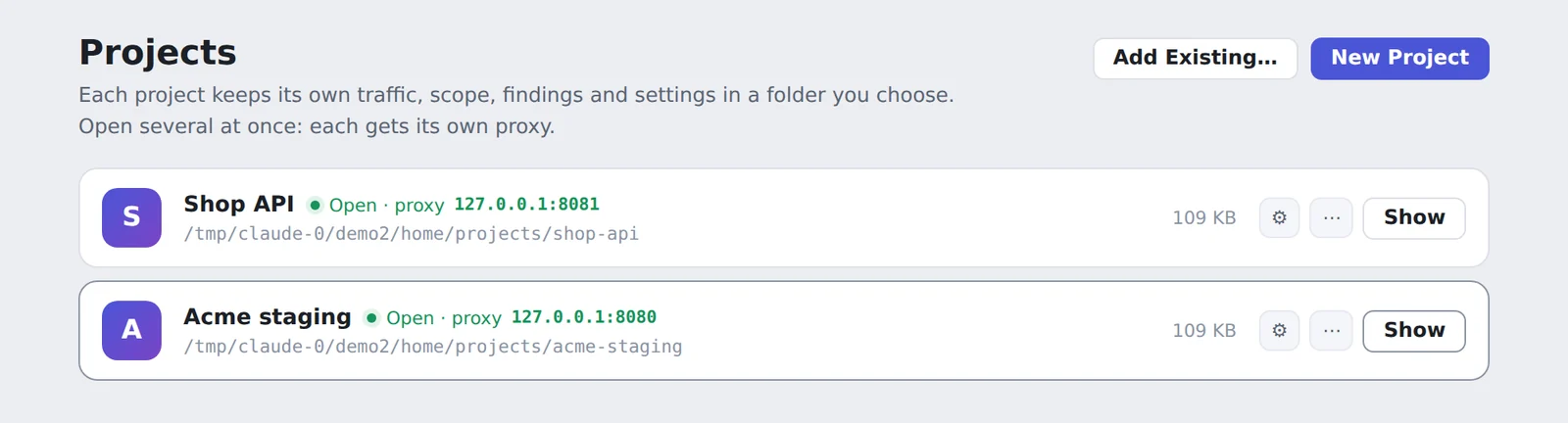
Several targets open, nothing colliding.
A project is a folder you choose. It holds its own traffic, scope, findings and settings. Open several at once: each gets its own window, proxy port, API and database. Trust the certificate once and it covers them all.
Turn on Keep only in-scope traffic and out-of-scope requests are deleted from disk when the project closes.
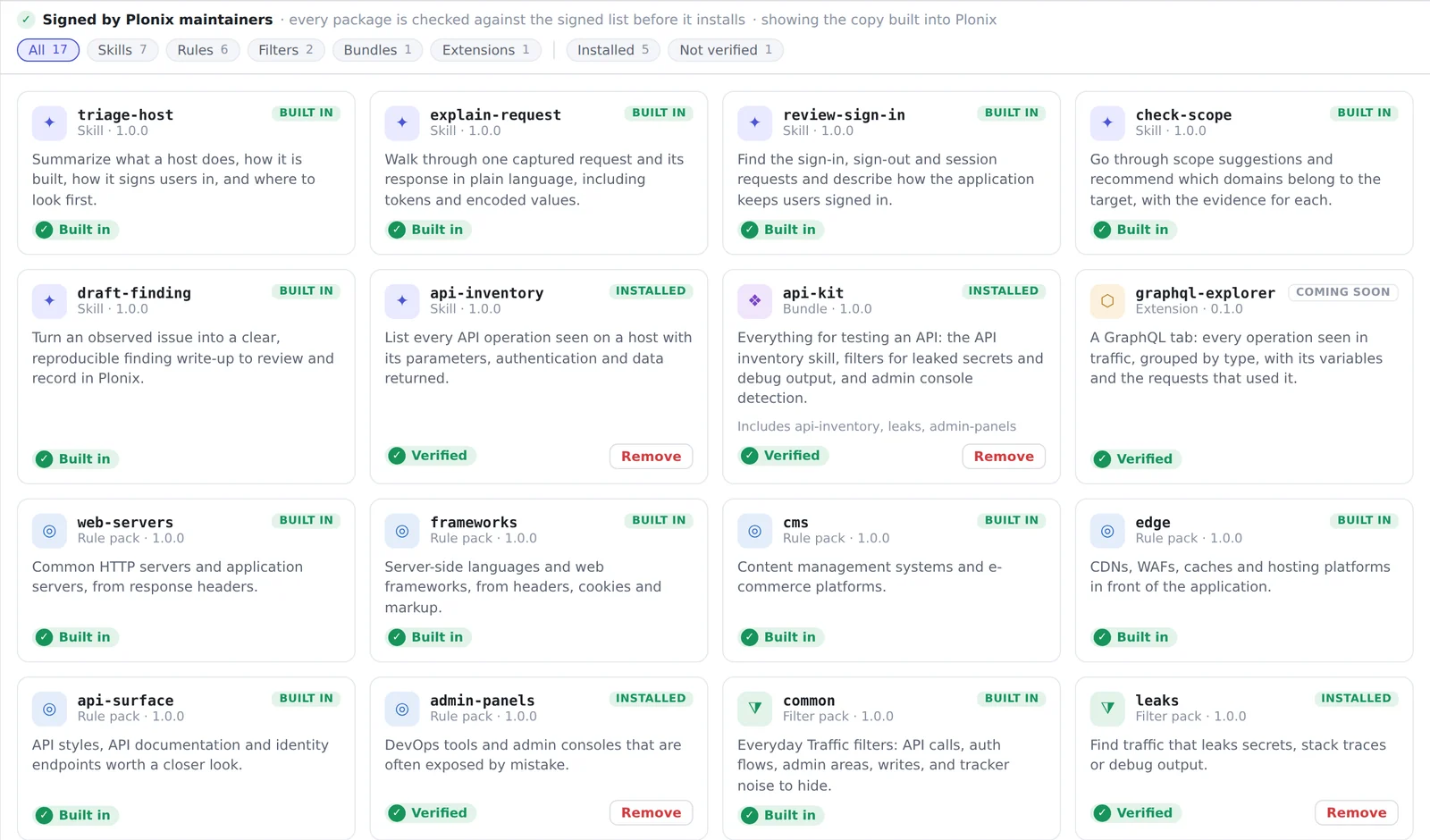
Add what you need, and know where it came from.
One catalog for everything modular: skills that tell an agent how to do a job, rule packs that recognise technologies, filter packs like is:auth, and bundles that install a set together. Open it with ⌘7 or run plonix market.
- Signed by the Plonix maintainers · every file is checked before anything installs
- Clear labels · Verified, Built in, Not verified, Changed
- Nothing runs code · skills are text and packs are data
- Host your own · a team Market with its own signing key
Anything you can click, you can script.
The window, the plonix command and agents are equal clients of one local API. Every command takes --json, and exit codes tell a script what happened, down to a request refused by scope.
The API listens on loopback only and needs a token from ~/.plonix/api-token.
$ plonix search host:acme.test status:5xx
$ plonix show 42
$ plonix watch scope:in
$ plonix scope review
$ plonix scope accept '*.acme-cdn.test'
$ plonix replay 42 -H 'Authorization: Bearer other-user' -t /api/users/2
$ plonix -p shop search status:5xx --json
$ TOKEN=$(cat ~/.plonix/api-token)
$ API=http://127.0.0.1:8090/api

$ curl -H "Authorization: Bearer $TOKEN" -G "$API/traffic" \
    --data-urlencode 'q=host:acme.test status:2xx'
$ curl -H "Authorization: Bearer $TOKEN" "$API/scope"
$ curl -H "Authorization: Bearer $TOKEN" -H 'Content-Type: application/json' \
    -d '{"domain":"*.acme.test"}' "$API/scope/accept"
Captured traffic in under a minute.
Plonix is in early development. Signed releases are on the way; until then, build it from source in a few commands or use the app attached to each CI build.
$ git clone https://github.com/SergeyMalych/plonix.git
$ cd plonix
$ cargo install --path crates/plonix-cli
$ plonix open example.com
✓ Certificate  ~/.plonix/ca.pem  (created)
✓ Proxy        127.0.0.1:8080
✓ Scope        example.com (+ subdomains)
✓ Browser      isolated profile, trusts Plonix
Capturing. Browse the site.